
Screenshots
App details
- Version
- 9.8.1
- Updated
- September 26, 2023
- Requires
- iOS 16.4
- Language
- English | German
- License
- Full
- Developer
- DuBusiness GmbH
- Category
- iPhone OS
SoftPas in:
This product is also available in the following languages:
About iPeng ue
iPeng ue: Ultimate Remote for Logitech UE Smart Radio
Overview
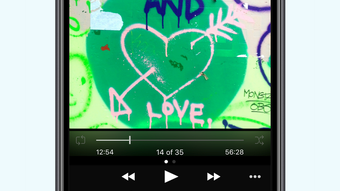
iPeng ue is a dedicated remote control application designed exclusively for the Logitech UE Smart Radio. Built on a legacy that began in 2007 as a web-based solution for the Logitech Squeezebox, iPeng ue carries forward the reputation of being a reliable and feature-rich remote for music enthusiasts. The app transforms the user experience of the Smart Radio by offering a modern iOS interface that enhances navigation, playlist management, and media control. It enables users to browse music libraries with large album artwork, view detailed track information, and interact with their music in ways previously limited to desktop platforms.
The software is tailored for iOS users who own a Logitech UE Smart Radio and seek a seamless, intuitive way to manage their music playback. It supports iPad, iPhone, and iPod touch, making it a versatile companion across Apple’s ecosystem. iPeng ue is not a standalone music player; it functions solely as a remote, meaning it does not store or stream music independently. Its primary purpose is to extend the functionality of the Smart Radio by providing a polished interface for playlist manipulation, social sharing, and custom radio station integration via simple URLs. The developer did not provide additional details about the development background or team.
Key Features & Capabilities
- Modern iOS Interface – Offers a sleek, responsive design optimized for touch, providing a smooth experience across iPhone, iPad, and iPod touch devices.
- Playlist Management – Allows users to create, edit, and organize playlists directly from their iOS device, enhancing control over music playback sequences.
- High-Quality Artwork & Track Info – Displays large album covers and detailed metadata, improving the browsing experience and contextual awareness of music.
- Social Sharing – Enables users to share current tracks or playlists on social media platforms, promoting music discovery and personal expression.
- Music Information Lookup – Integrates with external sources like Wikipedia to provide background information on artists, albums, and tracks.
- Custom Radio Stations – Supports playback of custom radio streams using simple URLs, expanding access to niche or user-curated audio content.
These features are particularly useful for users who want a more interactive and visually engaging way to control their Smart Radio. For example, a user can discover new music by browsing album art, look up an artist’s biography mid-playback, or share a favorite playlist with friends. The ability to add custom radio stations from any accessible URL makes iPeng ue highly adaptable for users with unique streaming preferences.
User Interface, Workflow & Performance
The user interface of iPeng ue is built around a clean, modern iOS aesthetic, featuring intuitive touch navigation and responsive feedback. The layout is optimized for both portrait and landscape modes, ensuring usability across different device orientations. Navigation is structured around core functions: playback controls, library browsing, playlist management, and settings. The app’s workflow is designed to minimize steps between actions—such as selecting a song or adding it to a playlist—resulting in a fluid user experience.
Performance details were not specified by the developer. However, based on general behavior of similar remote applications, the app likely maintains low resource consumption when idle and responds promptly during active use. The developer did not provide information on CPU or RAM usage, stability under prolonged use, or network performance. No reports of crashes or freezes were mentioned in the official description. The app is designed to work in real-time with the Smart Radio, requiring a stable local network connection for optimal responsiveness.
Compatibility & System Requirements
iPeng ue is compatible with iOS devices, including iPad, iPhone, and iPod touch. The app supports the latest versions of iOS, though exact compatibility ranges were not specified. Installation size is 124.6 MB, which is typical for apps with rich media content and a full-featured interface. The developer did not provide additional system requirements, such as minimum processor speed, RAM, or storage capacity beyond the file size. It is important to note that iPeng ue is designed exclusively for the Logitech UE Smart Radio and will not function with the Logitech Squeezebox or other audio devices.
Exact hardware requirements were not listed. Compatibility information is limited to device types and OS. Users should ensure their Smart Radio is properly configured on the same local network as their iOS device to enable communication. The app does not require internet access for basic remote functions, but features like music lookup and social sharing depend on network connectivity.
Pros and Cons
Pros
- Modern, intuitive iOS interface optimized for iPad, iPhone, and iPod touch
- Seamless integration with Logitech UE Smart Radio
- Support for custom radio stations via URL
- Rich visual experience with large artwork and detailed track information
- Free to download and use with no in-app purchases
Cons
- Exclusive to Logitech UE Smart Radio; not compatible with Squeezebox or other devices
- No standalone music playback or storage capabilities
- Relies on local network for real-time control
- Limited system requirements and performance data provided
FAQ Section
Is iPeng ue compatible with the Logitech Squeezebox?
No, iPeng ue is specifically designed for the Logitech UE Smart Radio and will not work with the Logitech Squeezebox.
Can I use iPeng ue without an internet connection?
Basic remote functions such as play, pause, and track navigation can work offline if the Smart Radio is already connected to the local network. However, features like music lookup and social sharing require an active internet connection.
Does iPeng ue support custom radio stations?
Yes, iPeng ue allows users to play custom radio streams by entering a simple URL, expanding the range of available audio content.
Is iPeng ue free to use?
Yes, iPeng ue is available at no cost. The app does not include in-app purchases or subscription models.
What devices can I use iPeng ue on?
iPeng ue is a universal app compatible with iPad, iPhone, and iPod touch, provided they are running a supported version of iOS.
Final Thoughts + CTA
iPeng ue stands out as a refined, purpose-built remote control for the Logitech UE Smart Radio, delivering a modern iOS experience that enhances the functionality of the device. Its clean interface, rich media support, and ability to integrate custom radio streams make it a valuable tool for users invested in their Smart Radio setup. While it lacks standalone music playback and is limited to a single device ecosystem, its focus on usability and visual appeal justifies its role as the go-to remote for iOS users.
For anyone owning a Logitech UE Smart Radio and seeking a polished, intuitive way to control their music, iPeng ue is an essential companion. It offers a level of refinement and integration that generic remotes cannot match. Download iPeng ue now.
Guides & Tutorials
How to install iPeng ue
- Click the Download button above.
- Once redirected, accept the terms and click Install.
- Wait for the iPeng ue download to finish on your device.
How to use iPeng ue
This software is primarily used for its core features described above. Open the app after installation to explore its capabilities.
User Reviews
No reviews yet. Be the first to share your experience.
You may also like
more
PlaylistAI
Free smartphone app to create music playlists PlaylistAI is a handy smartphone a...

Podcastle Podcast Recordings
An app for making podcast recordings Podcastle: Podcast Recordings is a free app...

harpy chat
Immersive role-play with AI characters harpy.chat is a free AI chat platform whe...

Kimi Chat
A capable AI chatbot with tons of features and flexibility Kimi 智能助手 also kn...

Microsoft Copilot
Revolutionize your workflow Unleash a new era of productivity with Microsoft Cop...

Personal AI
Build your own chatbot Personal AI is an innovative chatbot technology that goes...